Our website is made possible by displaying online advertisements to our visitors.
Please consider supporting us by disabling your ad blocker.
-
Dinosaur


 Please help an old Luddite. Facebook and the like.
It's a subject we've had before, indirectly. A recent bride wants to leave me a review, but she can't do it on A to E directly, as her Uncle made the initial enquiry. I've suggested feeding him the words for him to post, a link to Google reviews ( which I don't use enough ) and also just leaving a review under her wedding on my Facebook page.
Here's the big question, and bear in mind how technologically challenged I am re social media: Can I ( you/we ) make a dedicated section on my Fb page just for people to leave reviews? Simple question, I expect very complicated answers.
-
Yes, you have reviews turned on for your Facebook page so anyone can leave one there.
As a side, you're better at maintaining your Facebook page than I am!!
Julian
-
Web Guru


And for the record.... the Facebook and Twitter links on your website don't work!
-
Dinosaur

Originally Posted by
Marc J

And for the record.... the Facebook and Twitter links on your website don't work!
Well the Twitter one definitely won't work, cos I'm not on Twitter! The Facebook link is bad news though, thanks.
-
Personally I would steer people towards google and not fb for reviews.
To leave a review on fb you need to use a computer (not a mobile device) and a lot of people don't have one / don't use one / can't be bothered. With google they can use any device albeit need a gmail account of some sort.
The only reason I enter wedding awards is to actually get reviews as for most it is too much of a hassle to bother leaving reviews - and I don't blame them.
-
Originally Posted by
ppentertainments
Personally I would steer people towards google and not fb for reviews.
To leave a review on fb you need to use a computer (not a mobile device) and a lot of people don't have one / don't use one / can't be bothered. With google they can use any device albeit need a gmail account of some sort.
The only reason I enter wedding awards is to actually get reviews as for most it is too much of a hassle to bother leaving reviews - and I don't blame them.
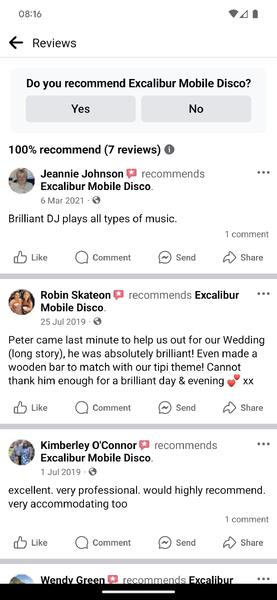
To be honest, Facebook reviews are dying a death. The way the ratings are calculated are a bit obscure and people have a general distrust of them and those who have bad ratings just turn them off anyway.
However, it does look like its possible to leave a review on the Facebook mobile app?
Google reviews are good, but there's been a few issues recently where businesses have been suspended from Google for one reason or another and found that all of their reviews have disappeared overnight. Bit scary that.
-
Originally Posted by
DJ Jules
Google reviews are good, but there's been a few issues recently where businesses have been suspended from Google for one reason or another and found that all of their reviews have disappeared overnight. Bit scary that.
Wonder if that is due to a clampdown on fake reviews, which most are.
-
You can send them directly to your review page on Facebook with Facebook.com/PAGENAME/reviews
-
Originally Posted by
ppentertainments
Wonder if that is due to a clampdown on fake reviews, which most are.
In the photography industry, someone who runs workshops started promoting the practice of reporting your competitors Google profiles to get them taken down so there's been a lot who have had issues lately. Google's rules technically say that your "business address" has to be the place you do business from and has to have a sign clearly displayed that shows that it is the place of business so most people who run their businesses from their home are in violation of the policy. The get around is to remove your business address and rely solely on coverage area and most got their profiles back on appeal, but there's quite a few who didn't.
I can't speak for anyone else, but my reviews are genuine.
Julian
-
Dinosaur
 Posting Permissions
- You may not post new threads
- You may not post replies
- You may not post attachments
- You may not edit your posts
-
Forum Rules



 Reply With Quote

 I was beginning to wish I'd never asked the
  question! Exactly the answer I was seeking.